IntelliBuddies Extension for Microsoft Edge Browser
There are multiple ways you can install IntelliBuddies Extension for Microsoft Edge.
Online Web Installer
You can install IntelliBuddies Microsoft Edge Extension using Online Web Installer. Perform the following steps:
- Start Online Web Installer.
- Go to Available tab.
- Search for IntelliBuddies Microsoft Edge Extension.
- Click on Install.
Offline Client Tools Installation
IntelliBuddies Microsoft Edge Extension gets installed when you install IntelliBuddies Client Tools using an offline installer.
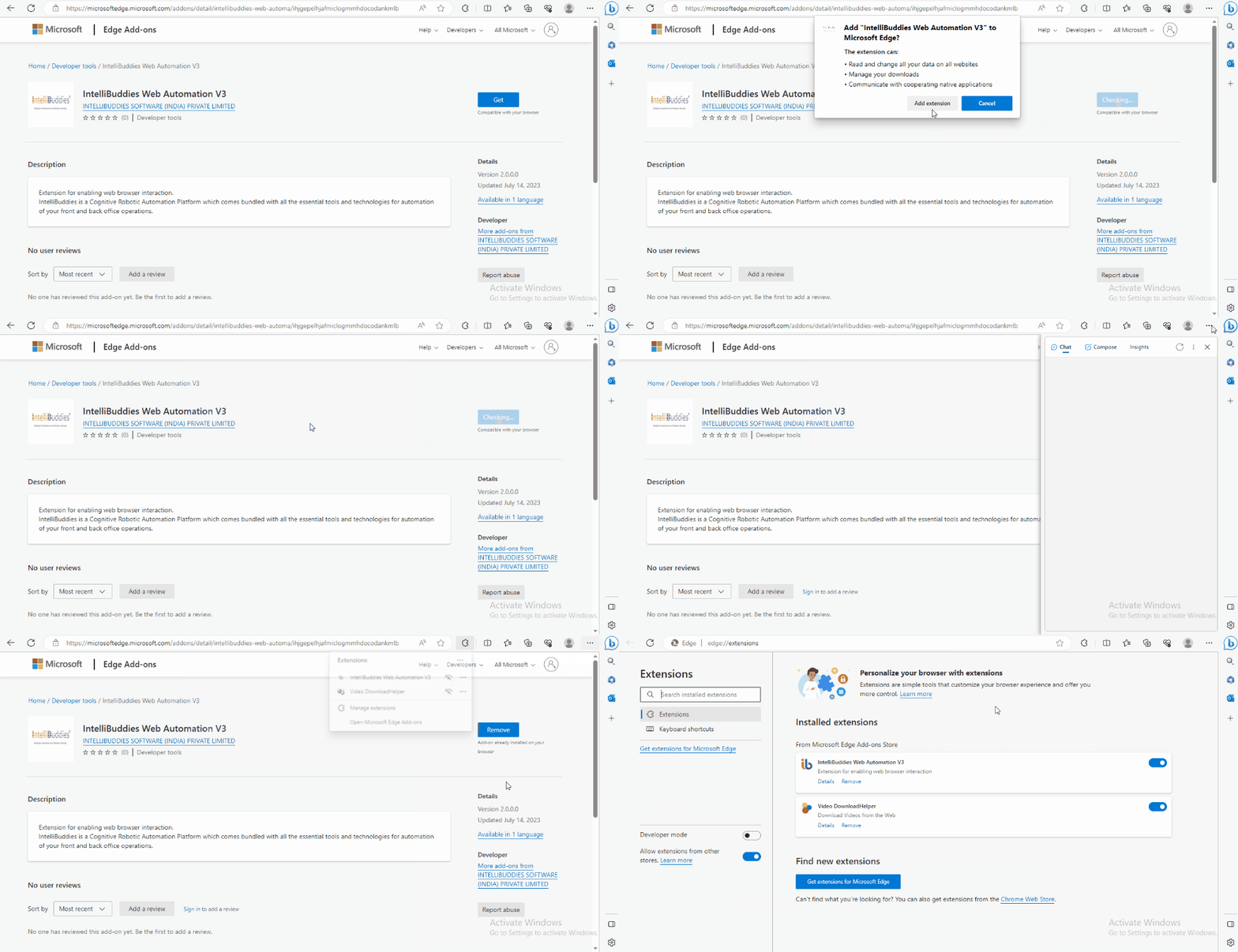
Installing from Microsoft Edge Add-ons
Step#1
-
Open the URL in Microsoft Edge browser.
-
Click on Get button
Step#2
- Click on Add extension in the dialog.
Step#3
- A message indicating the successful addition and usage of IntelliBuddies Web Automation V3 appears.
Enabling Extension
- Open the Microsoft Edge browser.
- A pop-up window will appear, asking to enable the IntelliBuddies Web Automation extension.
- To activate the IntelliBuddies Web Automation V3 extension, click the Turn on extension button.