Administration
Overview
The Knowledge Ingestion Service Administration page allows administrators to configure the infrastructure and external services required for semantic ingestion, embedding generation, vector storage, relationship storage, and ingestion orchestration.
These configurations are global to the environment and are maintained at the root-level tenant.
The administration configuration includes:
- Relational Database
- Vector Store
- Graph Database
- External Services
- Image Extraction
Root Tenant Requirement
Knowledge Ingestion Service administration can only be configured from the root tenant.
To access the administration configuration:
- Login to the AI Command Center using:
- Tenant:
root - Administrator credentials
- Tenant:
- Click the Gear icon available in the Title Bar
- Navigate to: Additional → Ingestion
The Ingestion Administration dialog is displayed.
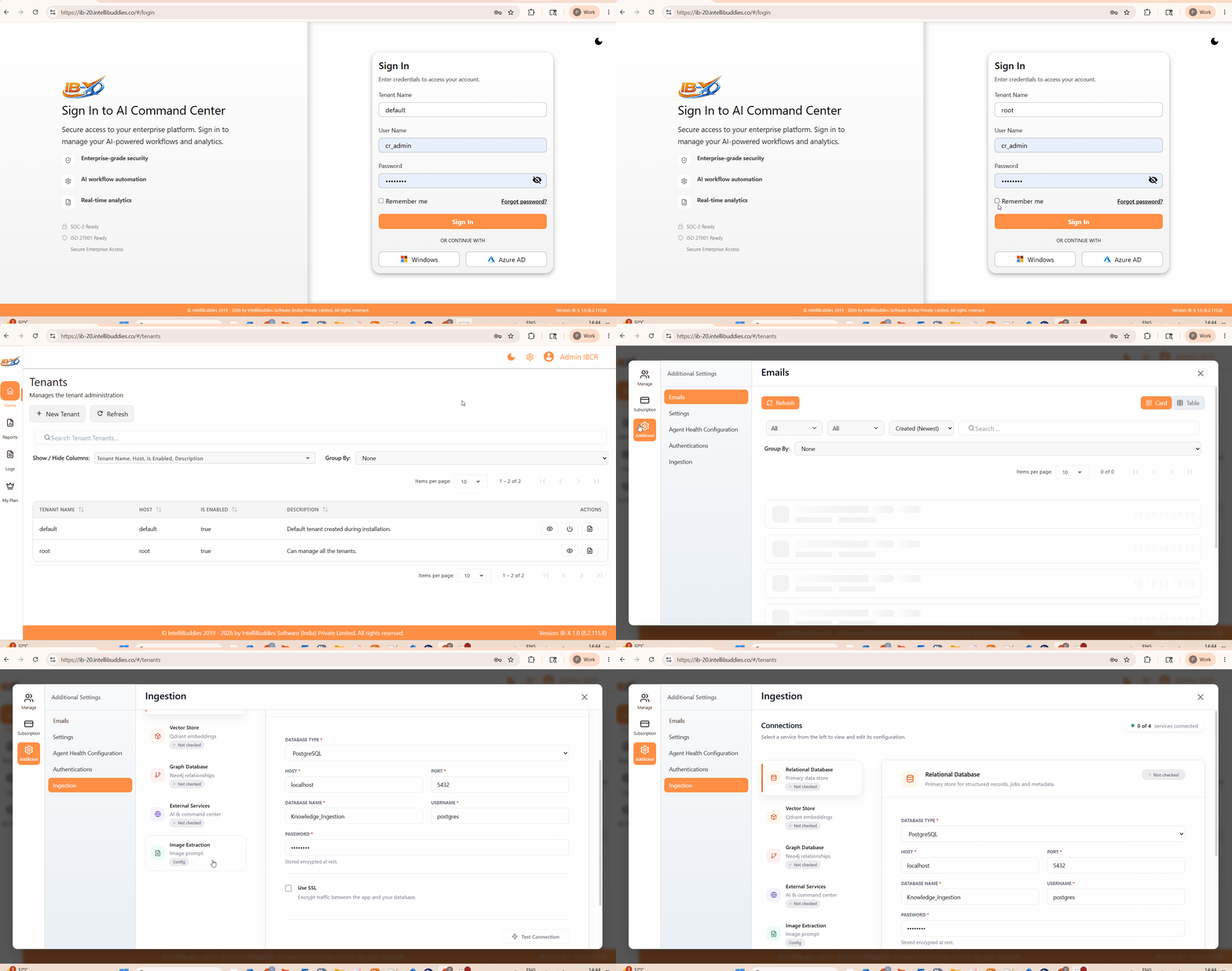
Administration Layout
The administration interface contains multiple configuration sections displayed as selectable configuration cards.
Each section represents a specific infrastructure dependency used by the Knowledge Ingestion Service.
The currently selected configuration section is displayed in the configuration panel on the right side.
Relational Database
The Relational Database configuration stores operational and ingestion metadata required by the Knowledge Ingestion Service.
This database acts as the primary structured metadata store.
The database stores:
- Ingestion definitions
- Runtime metadata
- URL tracking
- Processing state
- Ingestion runs
- Job metadata
- Operational records
Supported Database Types
Currently supported relational databases include:
- PostgreSQL
- MySQL
Configuration Properties
| Property | Description |
|---|---|
| Database Type | Type of relational database |
| Host | Database server host name or IP |
| Port | Database server port |
| Database Name | Name of the ingestion metadata database |
| Username | Database authentication username |
| Password | Database authentication password |
| Use SSL | Enables encrypted SSL communication |
Test Connection
The Test Connection operation validates:
- Connectivity
- Authentication
- Database availability
Vector Store
The Vector Store configuration defines the semantic vector database used for embedding storage and semantic retrieval.
The Vector Store stores:
- Semantic embeddings
- Vector collections
- Semantic similarity indexes
- Retrieval metadata
IB-X currently supports Qdrant as the vector storage provider.
Configuration Properties
| Property | Description |
|---|---|
| URL | Qdrant server endpoint |
| Collection | Collection used for semantic embeddings |
| API Key | Optional authentication key for secured Qdrant instances |
Test Connection
The Test Connection operation validates:
- Vector database accessibility
- Collection access
- Authentication
- Endpoint availability
Graph Database
The Graph Database configuration defines the relationship database used for storing semantic relationships and traversal structures.
IB-X currently supports Neo4j for graph storage.
The Graph Database is used for:
- Relationship mapping
- Semantic traversals
- Knowledge linking
- Graph-based retrieval scenarios
Configuration Properties
| Property | Description |
|---|---|
| URI | Neo4j connection URI |
| Username | Neo4j authentication username |
| Password | Neo4j authentication password |
Test Connection
The Test Connection operation validates:
- Neo4j connectivity
- Authentication
- Graph database accessibility
External Services
The External Services configuration defines service endpoints used by the ingestion engine for orchestration, embeddings, inference, and operational coordination.
These services integrate the ingestion platform with the AI infrastructure and operational console.
Configuration Properties
| Property | Description |
|---|---|
| AI Service Endpoint | Endpoint used for inference, embeddings, and ingestion orchestration |
| Command Center Base URL | Internal AI Command Center endpoint used for operational coordination and job monitoring |
Test Connection
The Test Connection operation validates:
- Service accessibility
- Endpoint availability
- Internal orchestration communication
Image Extraction
The Image Extraction configuration defines the default extraction prompt used when processing image-based content.
This prompt is used by the ingestion engine to extract semantic meaning, textual content, and contextual information from images discovered during ingestion.
Default Image Extraction Prompt
Specify the default extraction prompt that should be used for image analysis and semantic extraction.
The configured prompt is used when:
- No ingestion-specific image extraction prompt is supplied
- Image content is encountered during ingestion
- OCR and semantic interpretation are required
Configuration Status Indicators
Each configuration section displays a status indicator representing the current validation state.
Typical states may include:
| Status | Description |
|---|---|
| Not checked | Configuration has not been validated |
| Connected | Connection validation succeeded |
| Failed | Connection validation failed |
Saving Configuration
After configuring the required settings:
- Click Test Connection to validate connectivity
- Click Submit to save the configuration
The configuration is stored securely and used by the Knowledge Ingestion Service during ingestion and retrieval operations.
Reset Configuration
The Reset option restores the current configuration form to its last saved state.
Unsaved modifications are discarded.
Notes
- Knowledge Ingestion Administration is available only at the root tenant level.
- These configurations are global to the environment.
- The Vector Store configuration is required for semantic retrieval and embedding storage.
- The Graph Database configuration enables relationship-based retrieval scenarios.
- Passwords are stored securely and encrypted at rest.