Python - Installation
IntelliBuddies® Client Tools might require Python and supporting frameworks for organizations to utilize certain Machine Learning features. You must have the following software installed on your system to use these features.
This is an optional requirement, and you can continue using IntelliBuddies Client Tools without Python. However, there will be a limitation in using specific Machine Learning Activities that will need Python
Python installation
IntelliBuddies® Client Tools needs Python version 3.6. You can download Python from here:
https://www.python.org/downloads
Once you download Windows x86-64 executable installer from the above link, during installation, ensure to check Add Python \<\<Version>> to PATH option as depicted by the screenshot below:
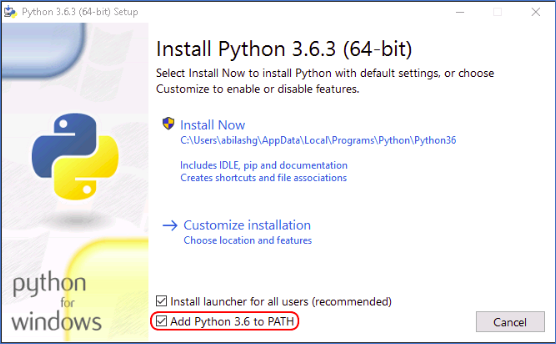
After successfully installing Python on the client system, you must run the following commands on the Command Prompt to install additional packages needed for Client Tools. Here is the list of commands in the proper sequence that needs to be executed from Command Prompt.
- pip install numpy==1.18.2
- pip install pandas==0.25.3
- pip install scipy==1.4.1
- pip install nltk==3.4.5
- pip install scikit-learn==0.22.2
- pip install spacy==2.2.0