Conversational Agent
Description
Use the Conversational Agent activity to build AI-powered conversational experiences in IB-X. This activity enables your agent to receive user messages, process them using the configured AI model and instructions, optionally invoke tools, and generate contextual responses.
The Conversational Agent activity can be used across supported communication channels, including Web Chat, WhatsApp, and Telephone.
The Conversational Agent activity is commonly used for:
- AI chatbots
- Knowledge assistants
- Support agents
- WhatsApp conversational assistants
- Telephone-based voice agents
- Voice and chat experiences
- Workflow-driven AI conversations
- AI agents with tool execution capabilities
The activity must always be connected to a supported conversational trigger activity. The trigger determines the communication channel through which the conversation is initiated.
Prerequisites
Before using the Conversational Agent activity:
-
Configure an AI model connection for the activity.
-
You can either:
-
Use your own provider API keys and model connections, or
-
Use Integration Gateway managed AI services, which require and consume IB-X Currency based on usage.
-
-
Ensure the required AI model is available and properly configured.
-
Add a supported conversational trigger activity before the Conversational Agent activity.
-
Configure the connection and channel-specific requirements for the selected trigger, where applicable.
-
Optionally configure tools that the agent can invoke.
Workflow Structure
A Conversational Agent workflow typically contains:
-
A supported trigger activity to receive an incoming conversation from the required communication channel.
-
A Conversational Agent activity to process the request.
-
Optional tool activities connected through the Tools connector.
-
Optional post-processing activities such as logging, notifications, or workflow actions.
Example:
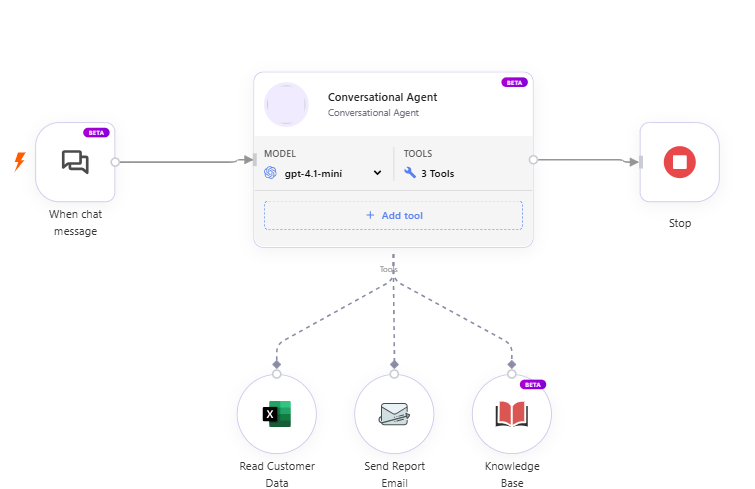
The trigger activity determines how the conversation enters the Agent. For example, the conversation can originate from Web Chat, WhatsApp, or an incoming Telephone call.
Trigger Requirement
The Conversational Agent activity requires a supported conversational trigger activity.
The trigger acts as the entry point for the conversation and is responsible for receiving the incoming request from the configured communication channel and providing the information required by the Conversational Agent.
Depending on the selected trigger, the incoming interaction may be:
- A Web Chat message
- A WhatsApp message
- A Telephone call
The trigger provides the channel-specific message, session, caller, or conversation information required to process the interaction.
Without a supported trigger activity, the Conversational Agent activity cannot start a conversation.
Supported Trigger Activities
The Conversational Agent activity supports the following trigger activities:
| Trigger | Channel | Description |
|---|---|---|
| Web Chat Trigger | Web Chat | Starts the conversational workflow when a user sends a message through the IB-X Web Chat interface. |
| WhatsApp Trigger | Starts the conversational workflow when a WhatsApp message is received through the configured WhatsApp Business Platform integration. | |
| Phone Call Trigger | Telephone | Starts the conversational workflow when an incoming telephone call is received through the configured telephony integration. |
The selected trigger determines the communication channel used to start the conversation, while the Conversational Agent provides the common AI conversation processing across these channels.
Web Chat
Use Web Chat Trigger to build browser-based conversational experiences.
This trigger is suitable for:
- Website chat
- Embedded chat widgets
- Web-based AI assistants
- Text and supported web voice experiences
The trigger provides the Web Chat session and incoming user message to the Conversational Agent.
WhatsApp
Use WhatsApp Trigger with the Message Received event to build WhatsApp-based conversational experiences.
This trigger receives incoming messages from the WhatsApp Business Platform through the configured webhook and starts the conversational workflow.
Typical scenarios include:
- WhatsApp customer support
- WhatsApp virtual assistants
- Customer inquiries
- Service requests
- Conversational business workflows
A configured WhatsApp connection and Meta webhook are required.
For information about configuring the WhatsApp integration, see WhatsApp Connection.
Telephone
Use Phone Call Trigger to build telephone-based voice conversational experiences.
The trigger starts the conversational workflow when an incoming telephone call is received through the configured telephony integration.
Typical scenarios include:
- Customer support voice agents
- Help desk assistants
- Appointment and service assistants
- Interactive voice conversations
- Telephone-based AI assistants
The incoming caller interacts with the Conversational Agent using speech. The configured speech-to-text provider transcribes the caller's speech, and the configured text-to-speech provider converts the agent's responses into spoken audio.
Voice and Transcriber settings are particularly important for telephone-based Conversational Agents because the conversation is conducted using spoken audio.
Channel-Based Conversation Flow
The Conversational Agent provides a common conversational experience regardless of how the user enters the conversation.
The trigger handles the channel-specific interaction, while the Conversational Agent handles AI reasoning, conversation memory, instructions, and tool execution.
Web Chat
Web User
   ↓
Web Chat Trigger
   ↓
Conversational Agent
   ↓
Web User
WhatsApp
WhatsApp User
   ↓
Meta WhatsApp Business Platform
   ↓
WhatsApp Trigger
   ↓
Conversational Agent
   ↓
WhatsApp User
Telephone
Caller
   ↓
Telephony Channel
   ↓
Phone Call Trigger
   ↓
Conversational Agent
   ↓
Caller
Although the communication channel is different, the same Conversational Agent capabilities — including instructions, AI models, memory, tools, and response generation — can be used across the supported channels.
Agent Persona
Use the Agent Persona section to customize the personality of the conversational agent.
Agent Name
Specify the display name of the AI agent.
Example:
Lily
Agent Role
Specify the role or designation of the agent.
Example:
Conversational Agent
Instructions
Provide the system instructions that define the behavior, capabilities, response style, and tool usage patterns of the conversational agent.
The Instructions field acts as the core behavioral definition of the agent and significantly influences how the agent understands user requests, responds to conversations, invokes tools, and handles workflow decisions.
Use this field to:
- Define the role and responsibility of the agent
- Configure conversational tone and response behavior
- Define response formatting rules
- Specify tool usage behavior and boundaries
- Configure safety, compliance, and fallback behavior
- Restrict unsupported or unsafe operations
For detailed guidance and best practices on writing effective agent instructions, refer to the Conversational Agent Instructions Guide.
Model Configuration
Model
Select the AI model that the Conversational Agent activity should use.
The list of available models depends on the configured AI model connections, which may include:
- Customer-managed provider connections using your own API keys
- Integration Gateway managed AI services provided by IB-X
Available models vary based on the selected provider, configured connection, and supported capabilities.
Temperature
Specify the creativity level of the response generation.
- Lower values produce more deterministic responses.
- Higher values produce more creative responses.
Voice Configuration
Use the Voice section to configure text-to-speech(TTS) settings for the conversational agent.
Select Provider
Select the provider used for text-to-speech voice synthesis.
The selected provider determines how the conversational agent generates spoken responses during voice interactions.
| Option | Description |
|---|---|
| Deepgram | Uses Deepgram text-to-speech services to generate low-latency AI voice responses. |
| Sarvam | Uses Sarvam Bulbul text-to-speech services to generate natural AI voice responses optimized for Indian languages. |
Text-to-Speech Connection
Select the connection used for text-to-speech processing.
You can either:
- Use a customer-managed provider connection configured with your own provider API keys, or
- Use an Integration Gateway managed service connection provided by IB-X.
Integration Gateway managed service connections consume IB-X Currency based on usage.
The selected connection determines:
- The text-to-speech provider used for voice synthesis
- Authentication and API access configuration
- Available voice models and capabilities
- Usage billing behavior
Model
Specify the text-to-speech model to be used for voice synthesis.
The available models are dynamically populated based on the selected text-to-speech provider and configured connection.
Different providers and connections may expose different voice synthesis models and capabilities.
Agent Voice
Select the virtual voice used by the Conversational Agent for speech responses.
The available voices are dynamically populated based on the selected voice provider and text-to-speech model.
After selecting the provider and model, the system displays the supported virtual voices available for that configuration.
Available voices may vary based on:
- Provider capabilities
- Selected model
- Supported languages
- Accent variations
- Gender options
- Voice profiles
You can preview available voices before selecting the preferred voice for the Conversational Agent.
When Sarvam is selected, you can choose a synthesis language from the supported Indian locales, including English, Hindi, Bengali, Tamil, Telugu, Kannada, Malayalam, Marathi, Gujarati, Punjabi, and Odia.
Available speakers can be previewed using sample audio before selecting a voice.
You can also select Auto to automatically use the language detected during transcription as the synthesis language.
Speed
When Sarvam is selected as the voice provider, the Speed option is available to control the speech rate of generated voice responses.
The supported speed range depends on the selected Bulbul model:
- Bulbul v3 — 0.5 to 2.0
- Bulbul v2 — 0.3 to 3.0
A lower value produces slower speech, while a higher value produces faster speech.
Transcriber Configuration
Use the Transcriber section to configure speech-to-text(STT) settings for voice conversations.
Select Provider
Select the provider used for speech-to-text transcription.
The selected provider determines how spoken audio is converted into text during voice conversations.
| Option | Description |
|---|---|
| Deepgram | Uses Deepgram speech-to-text services for low-latency, real-time audio transcription. |
| Sarvam | Uses Sarvam Saaras / Saarika speech-to-text services for real-time transcription optimized for Indian languages. |
Speech-to-Text Connection
Select the connection used for speech-to-text transcription processing.
You can either:
- Use a customer-managed provider connection configured with your own provider API keys, or
- Use an Integration Gateway managed service connection provided by IB-X.
Integration Gateway managed service connections consume IB-X Currency based on usage.
The selected connection determines:
- The speech-to-text provider used for transcription
- Authentication and API access configuration
- Available transcription models and capabilities
- Usage billing behavior
Language
Specify the language used for speech-to-text transcription.
The available languages are dynamically populated based on the selected speech-to-text provider and transcription model.
English is selected by default unless a different language is explicitly selected.
Available languages may vary depending on the selected provider and transcription model.
When Sarvam is selected, you can choose a specific supported language or select Auto.
When Auto is selected, Sarvam automatically detects the spoken language during transcription.
If the Sarvam Voice synthesis language is also set to Auto, the language detected during transcription is automatically used as the target language for text-to-speech (TTS) synthesis.
For detailed information about supported languages and models, refer to the provider documentation:
Use Case
Specify the speech recognition optimization profile used for transcription.
The available use cases are dynamically populated based on the selected speech-to-text provider and transcription model.
Depending on the provider and model, use cases may be optimized for scenarios such as:
- General conversations
- Phone call audio
- Meetings
- Voice assistants
- Customer support interactions
- Noisy environments
- Domain-specific speech recognition
The available use cases and their behavior vary depending on the selected provider and transcription model.
Use Case is not applicable when Sarvam is selected as the transcriber provider. The field is hidden for Sarvam configurations.
For detailed information about supported use cases and optimization profiles, refer to the provider documentation:
Model
Specify the speech-to-text model used for audio transcription.
The available models are dynamically populated based on the selected speech-to-text provider and configured connection.
Different providers and connections may expose different transcription models with varying capabilities, performance characteristics, language support, and optimization profiles.
Memory Settings
Use the Memory Settings section to configure how conversation history and contextual memory are maintained across interactions.
Memory management helps the conversational agent:
- Preserve conversational continuity
- Maintain contextual awareness across multiple user interactions
- Optimize token consumption
- Support long-running conversations efficiently
- Prevent conversation context from exceeding model token limits
History Limit
Specify the maximum number of recent conversation messages to load into the active conversation context.
This determines how much historical conversation data is available to the agent during response generation.
If not specified, a default value of 50 messages is used.
Higher values improve contextual continuity but may increase token consumption and response latency.
Context Summarization
Enable this option to automatically summarize older conversation history when the conversation context grows beyond configured limits.
Context summarization helps:
- Reduce token usage
- Prevent context window exhaustion
- Maintain long-running conversations efficiently
- Preserve important historical context in condensed form
When enabled, the system replaces older conversation segments with a summarized representation while retaining recent messages in full detail. The summarization is triggered based on the configured summarization thresholds listed below.
Max Context Tokens
Specify the approximate token threshold for the conversation context.
When the estimated context size exceeds this value, the system automatically triggers context summarization.
This helps ensure that the conversation remains within the supported token limits of the selected AI model.
Max Unsummarized Messages
Specify the maximum number of new messages allowed since the last summarization operation.
When this limit is reached, summarization is triggered even if the token threshold has not yet been exceeded.
This helps maintain efficient context management during extended conversations.
Summary Target Tokens
Specify the approximate target token size for the generated summary.
During summarization, the AI model attempts to compress older conversation history within this token budget while preserving important conversational context.
Lower values produce shorter summaries with lower token usage.
Min Messages to Keep
Specify the minimum number of most recent conversation messages that should always remain in their original form.
These recent messages are excluded from summarization to ensure that the AI model retains full visibility into the latest conversational context.
This helps preserve conversational accuracy and response relevance for recent interactions.
Tools Connector
The Conversational Agent activity provides a dedicated Tools connector.
Use this connector to attach tool activities that the AI agent can invoke dynamically.
Examples of tools include:
- HTTP Request
- Database operations
- Knowledge retrieval
- File operations
- Email activities
- Custom actions
- Workflow execution
The AI model determines when and how to invoke the connected tools based on the conversation context and instructions.
Advanced
The Advanced section provides additional configuration options to fine-tune how the Voice Agent listens, detects speech, handles interruptions, and manages idle conversations.
These settings are intended for advanced scenarios where the default behavior needs to be adjusted to suit specific telephony environments or conversational requirements.
For most deployments, the default values are recommended and do not require modification.
Listening, speech detection, and interruption settings are described in Advanced Voice Settings.
Inactivity & Session Settings
Use Inactivity & Session Settings to configure what the agent does when the user stops responding, and when the conversation ends.
For voice conversations, inactivity is handled in two stages: the agent first prompts the user to respond, then starts the conversation-end period after the maximum number of idle prompts. For text-only Web Chat, the conversation-end period runs without idle prompts.
To configure these settings, open the Conversational Agent activity and go to Advanced > Inactivity & Session Settings.
Idle Detection
Idle Detection applies to voice conversations.
- On Web Chat, idle prompts apply while voice is connected. The agent speaks the idle message, and it appears in the conversation history.
- On Telephone, the agent speaks the idle message after the caller remains silent for the configured wait.
Text-only Web Chat conversations do not receive idle prompts.
In Web Chat, user interaction, including moving the pointer or typing in the message input, restarts the idle wait and resets the idle prompt count. If the user becomes inactive again, the agent can issue the configured number of prompts again. On telephone calls, a spoken response allows the conversation to continue.
After speaking an idle prompt, the agent returns to listening for the user's response.
Idle Message
Specify the message the agent sends when the user has not responded.
Example idle message:
Are you still there?
You can enter plain text or an expression.
For example, a support agent might use I'm here to help. Would you like to continue?
Expressions can reference Agent Data or Workflow Data. For example, use a customer-name value from either source to personalize the idle message:
[Customer name], would you like to continue?
[Customer name] is an illustrative placeholder. Replace it with an expression referencing the appropriate Agent Data or Workflow Data field. For a customer named Priya, the resolved message is Priya, would you like to continue? Test the expression with the data available in both Web Chat and telephone workflows, as applicable.
Wait before idle prompt
Specify, in seconds, how long the agent waits after the user stops responding before it sends the idle message.
The same wait is used before each additional idle message.
Maximum idle prompts
Specify how many times the agent sends the idle message before the conversation-end period begins.
Automatic Conversation End
Automatic Conversation End applies to text and voice conversations on Web Chat, and to telephone calls.
End conversation after
Specify, in minutes, how long inactivity can continue before the conversation ends.
On a voice conversation, this period begins after the last idle message. On a text-only Web Chat conversation, this period is the inactivity time before the conversation ends.
Ending warning
Specify, in minutes, how long before the conversation ends the agent warns the user that it will close. This value is a lead time before the end, rather than an additional waiting period.
Choose a warning lead time shorter than End conversation after so that the warning occurs within the conversation-end period.
Example: An Unanswered Voice Conversation
Suppose you configure the following values:
| Setting | Example value |
|---|---|
| Idle Message | Are you still there? |
| Wait before idle prompt | 20 seconds |
| Maximum idle prompts | 2 |
| End conversation after | 2 minutes |
| Ending warning | 1 minute |
If the user remains inactive, the agent waits 20 seconds before the first idle prompt and uses the same wait before the second prompt. After the final prompt, the two-minute conversation-end period begins. The warning occurs one minute before that period expires, and the conversation ends if the user remains inactive. Allow for the time taken to speak the prompts when testing the sequence.
If the user interacts in Web Chat between prompts, the idle wait and prompt count restart. For text-only Web Chat, the same example ends the conversation after two minutes of inactivity, with a warning one minute before the end and no idle prompts.
These values illustrate the sequence; they are not defaults.
Example Scenario
AI Support Assistant
A single Conversational Agent can be designed to provide AI-powered support through a supported communication channel.
For example:
- A user starts an interaction through Web Chat, WhatsApp, or Telephone.
- The corresponding trigger receives the incoming interaction.
- The trigger provides the conversation information to the Conversational Agent.
- The Conversational Agent processes the request using the configured model and instructions.
- The agent optionally invokes tools to retrieve information or perform business operations.
- The generated response is returned to the user through the originating communication channel.
- Optional downstream activities can perform additional operations such as logging or notifications.
The trigger determines how the conversation enters the workflow, while the Conversational Agent provides the common AI-powered conversational behavior.
Best Practices
- Select the trigger that corresponds to the communication channel through which users will interact with the Conversational Agent.
- Use Web Chat Trigger for Web Chat conversations.
- Use a short, clear idle message and allow enough time for users to respond, especially when they need to look up information.
- Test an unanswered conversation, a response between idle prompts, and an idle message expression with representative Agent Data or Workflow Data before publishing.
- Use WhatsApp Trigger with Message Received for WhatsApp conversations.
- Use Phone Call Trigger for incoming telephone conversations.
- Configure and test the required channel connection before publishing the Agent.
- Always provide clear and specific instructions.
- Keep system prompts concise and deterministic where possible.
- Use tool calling only when required.
- Restrict unnecessary tool access.
- Configure reasonable token limits.
- Use conversation memory carefully for long-running conversations.
- Configure appropriate Voice and Transcriber settings for voice-based channels.
- Validate AI-generated outputs before performing critical operations.
Notes
- The Conversational Agent activity requires a supported conversational trigger activity.
- The trigger determines the communication channel used by the conversation.
- Supported conversational channels include Web Chat, WhatsApp, and Telephone.
- WhatsApp conversational workflows use WhatsApp Trigger with the Message Received event.
- Web Chat conversational workflows use Web Chat Trigger.
- Telephone conversational workflows use Phone Call Trigger.
- Idle messages apply to Web Chat voice sessions and telephone calls.
- End conversation after and Ending warning apply to text and voice Web Chat conversations and to telephone calls.
- Channel-specific connections and configuration must be completed before the corresponding trigger can receive conversations.
- Tool execution depends on the connected tool activities.
- Available models depend on the configured AI providers.
- Response quality depends on the configured instructions, model, and conversation context.
- Conversation history may impact token consumption.