Knowledge Grounding
Overview
Knowledge Grounding enables a Conversational Agent to answer questions using enterprise knowledge that has been ingested into the platform.
Instead of relying solely on the underlying AI model, the agent can retrieve relevant information from configured knowledge sources and use that information when generating responses.
Knowledge grounding helps improve:
- Response accuracy
- Business relevance
- Consistency
- Knowledge discovery
- User trust
Knowledge Grounding Workflow
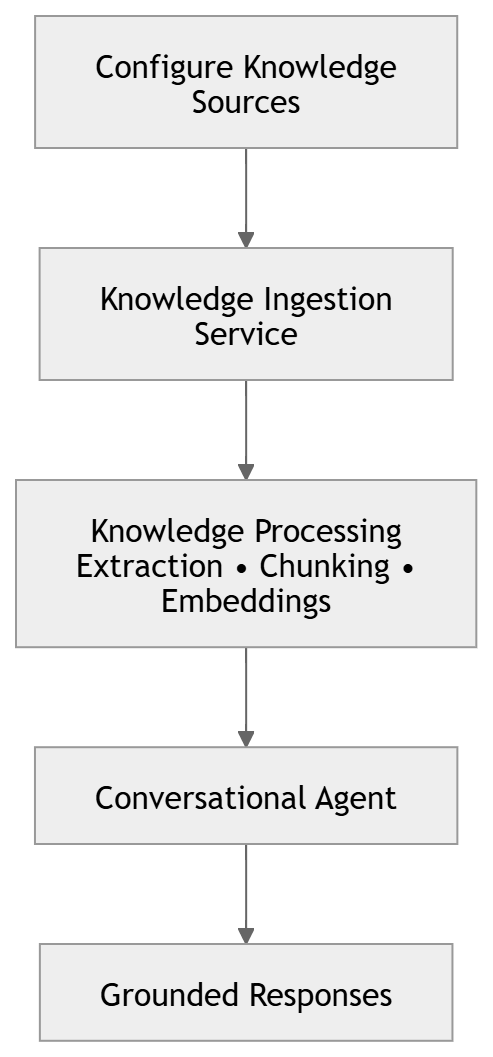
Knowledge grounding in IB-X begins with knowledge ingestion.
Before a Conversational Agent can use enterprise content, the content must first be configured and ingested through the Knowledge Ingestion Service.
The overall process is:
Configuring Knowledge Grounding
Knowledge grounding is configured at the Agent level.
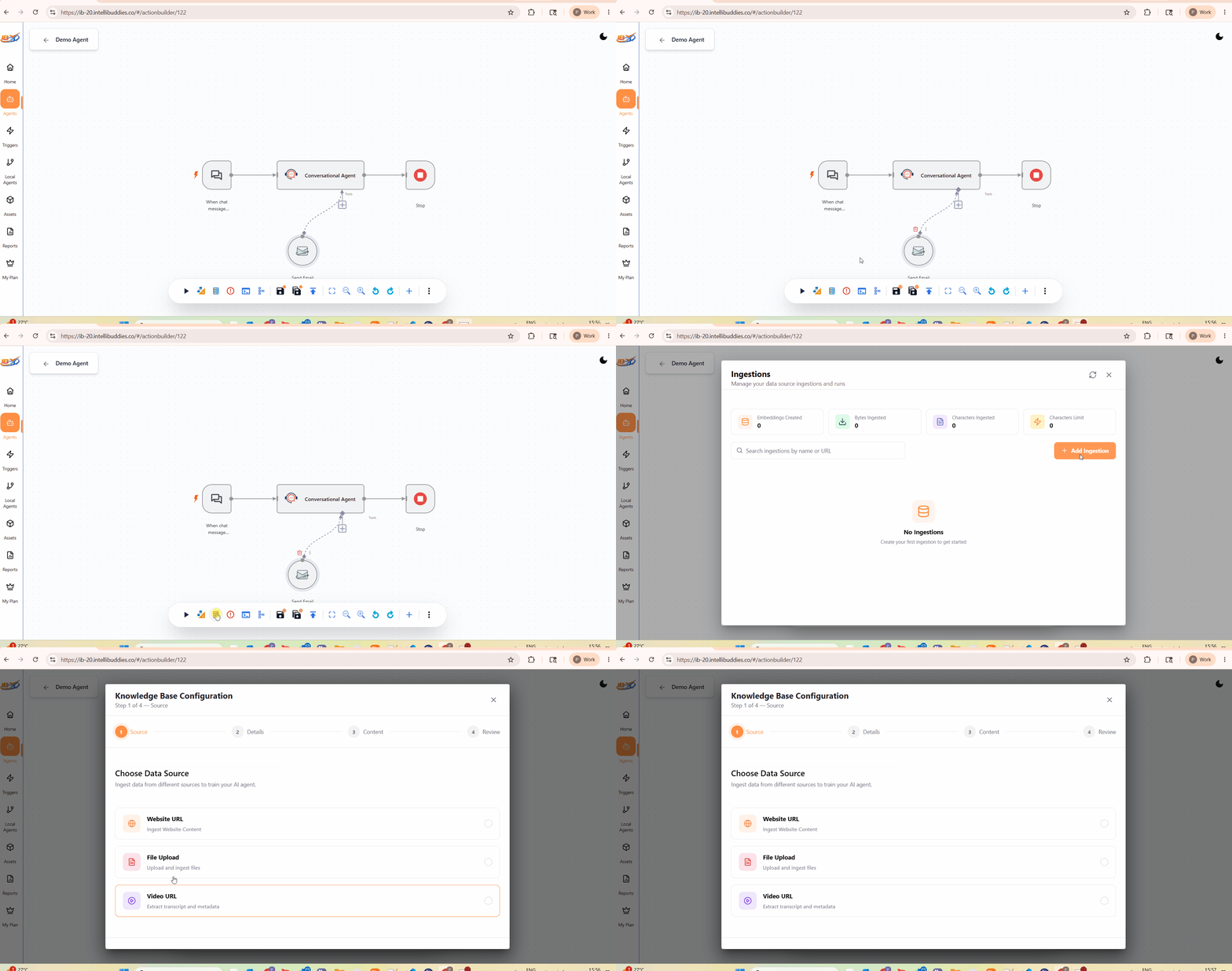
To associate enterprise knowledge with a Conversational Agent:
- Open the Agent in the Agent Builder.
- Click Ingestions from the bottom of the designer canvas.
- Configure and ingest the required knowledge sources.
- Wait for the ingestion process to complete.
Once the content has been successfully ingested, it becomes available to the Conversational Agent during conversations.
Knowledge Ingestion Service
Knowledge grounding relies on the Knowledge Ingestion Service.
The Knowledge Ingestion Service is responsible for configuring, ingesting, processing, and maintaining the knowledge sources used by Conversational Agents.
For detailed information about:
- Supported source types
- Source configuration
- Website ingestion
- File upload ingestion
- Administration
- Operations
- Troubleshooting
refer to the Knowledge Ingestion Service documentation.
Using Knowledge During Conversations
Once knowledge sources have been ingested, the Conversational Agent can use the available knowledge during conversations through the Knowledge Base activity.
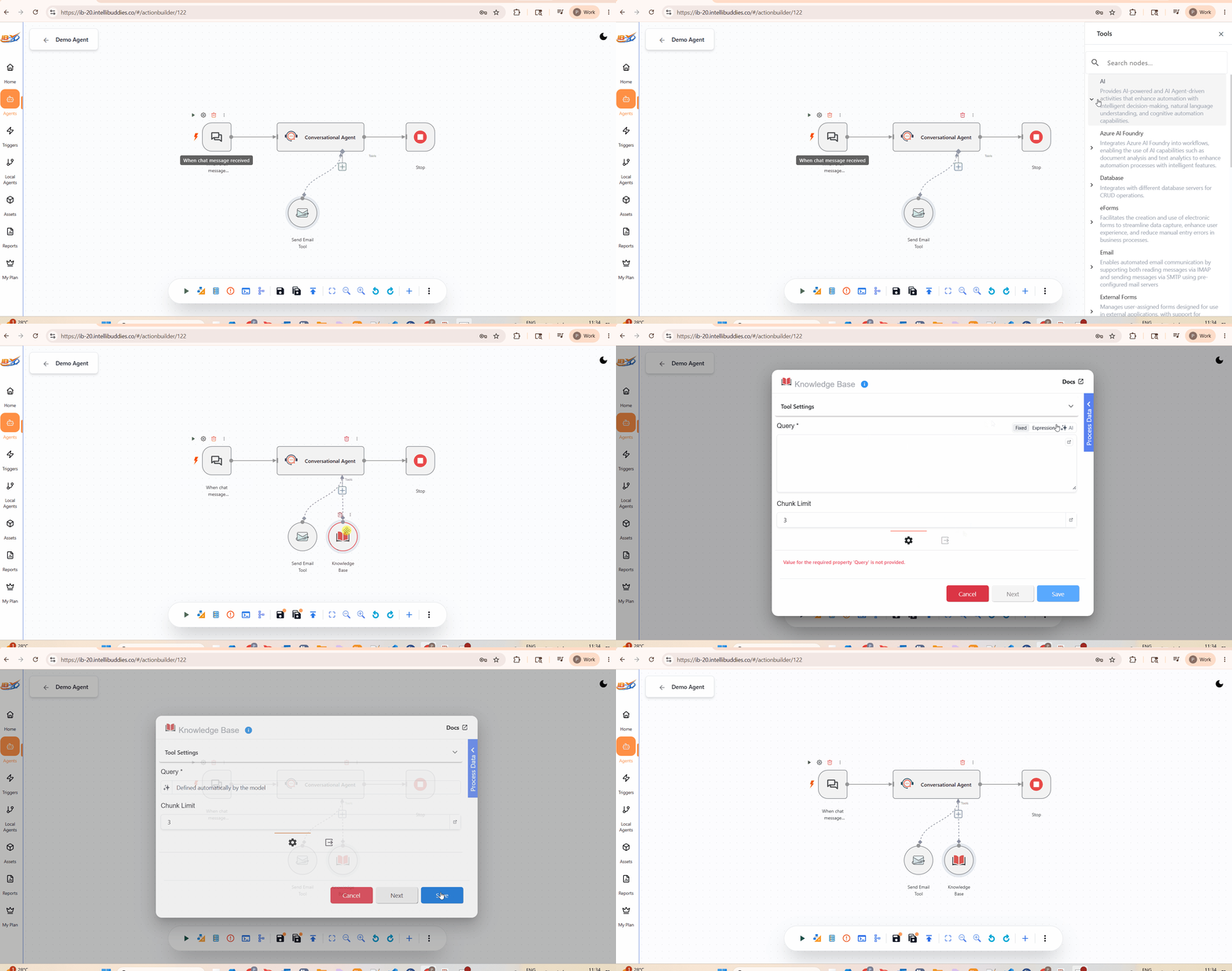
To enable knowledge retrieval:
- Add a Knowledge Base activity from the AI category.
- Connect the activity to the Tools connector of the Conversational Agent activity.
- Configure the Query property to be generated by the AI model.
- Save the configuration.
When a user asks a question, the Conversational Agent can invoke the Knowledge Base activity to retrieve relevant information from the Agent's configured knowledge sources.
The retrieved information is then incorporated into the response generated for the user.
Typical scenarios include:
- Product support
- Employee assistance
- Policy lookup
- Documentation search
- Knowledge discovery
- Internal helpdesk solutions
Maintaining Knowledge
Enterprise knowledge changes over time.
To keep responses accurate:
- Regularly review configured knowledge sources.
- Re-ingest content when source information changes.
- Remove obsolete content when no longer required.
- Validate knowledge coverage before publishing agents.
Well-maintained knowledge sources lead to higher-quality responses and improved user experience.
Best Practices
- Ingest authoritative content only.
- Keep documentation current and accurate.
- Organize knowledge sources logically.
- Use descriptive source names.
- Regularly monitor ingestion status and processing results.
- Test knowledge retrieval using representative business questions.