AWS EKS Deployment Overview
Deploy the IB-X AI Command Center (AICC) and its associated services in your AWS environment using Amazon Elastic Kubernetes Service (EKS). IntelliBuddies supplies prebuilt container images and a Helm deployment package. Your Infrastructure and DevOps teams provision and operate the AWS infrastructure and deploy approved images from Amazon Elastic Container Registry (ECR).
Deployment architecture
This diagram shows the wider deployment landscape: separate Staging and Production environments, customer infrastructure, IntelliBuddies-hosted services, and the associated connections.
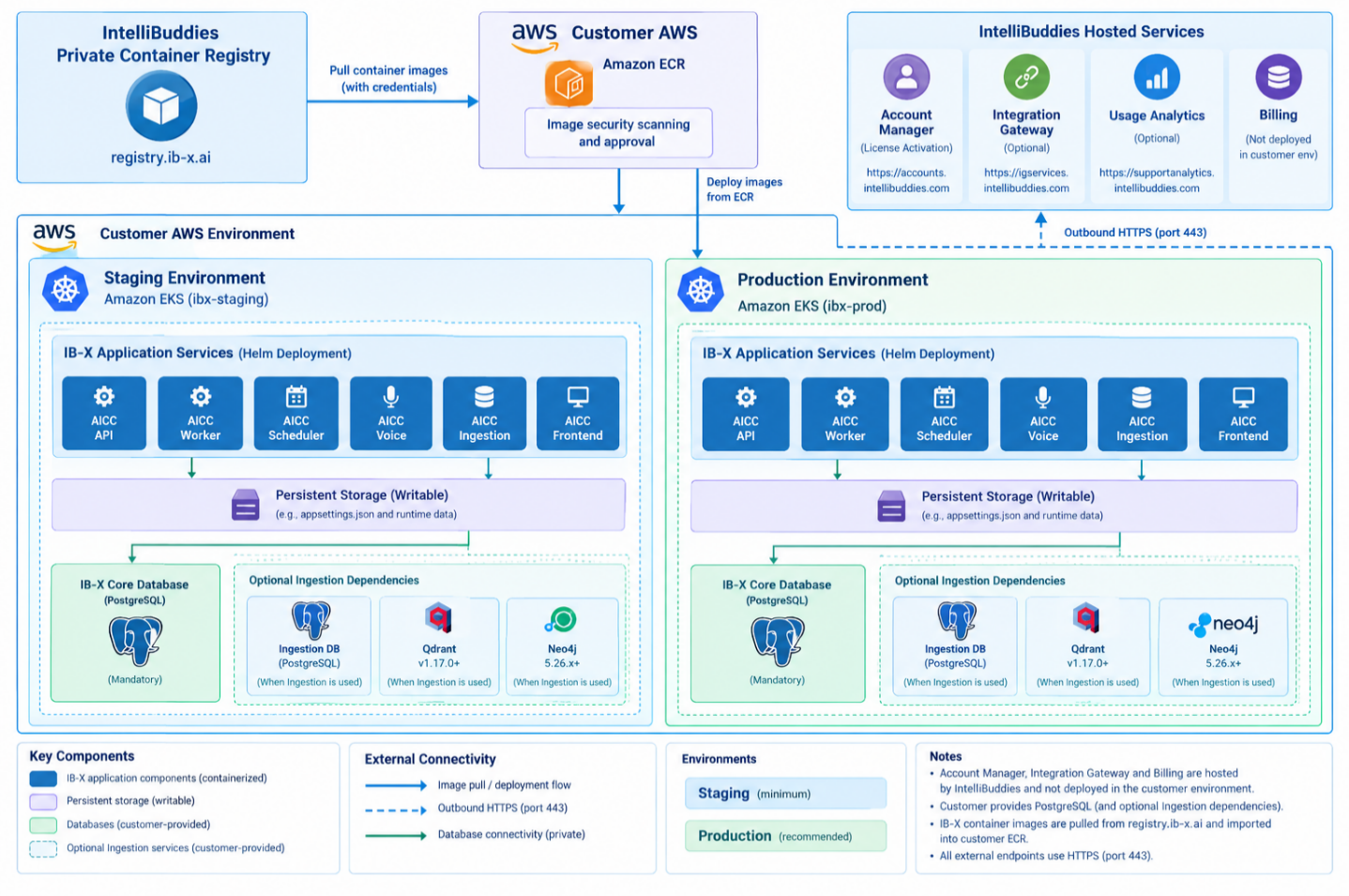
Maintain separate Staging and Production environments. You may use independent EKS clusters or separate namespaces on a shared cluster according to your infrastructure standards. Isolate application configuration, secrets, databases, and persistent storage for each environment.
Runtime components and connectivity
This diagram expands the runtime dependencies within one environment: ALB and ACM, the six application services, bundled Redis, shared EFS storage, customer databases, and optional TURN and S3. Apply the same structure independently to Staging and Production.

Application components
The deployment package includes the following services. The supplied configuration uses one replica per service; additional scaling and high availability require separate validation.
| Component | Kubernetes resource | Default replicas | Container port |
|---|---|---|---|
| AICC API | Deployment | 1 | 8080 |
| AICC Worker | Deployment | 1 | 8080 |
| AICC Scheduler | Deployment | 1 | 8080 |
| AICC Voice | Deployment | 1 | 8080 |
| AICC Ingestion | Deployment | 1 | 8080 |
| AICC Frontend | Deployment | 1 | 8080 |
| Redis | Deployment and internal ClusterIP Service | 1 | 6379 |
Supporting resources provide networking, configuration, secrets, and persistent storage.
Redis
Redis is mandatory for work queues and the SignalR backplane. Keep redis.enabled: true. The supplied release supports bundled Redis only; external services such as Amazon ElastiCache are not supported by this deployment configuration.
Redis uses password authentication, one replica, and in-memory storage. It is not a high-availability or durable messaging service. Services reconnect after a restart, but temporary messages and notifications can be interrupted or lost. Persisted workflow state remains in the application database; investigate affected operations before retrying them.
Mirror Redis into customer ECR alongside the six application images and OCI chart. The deployment toolkit contains scripts, configuration templates, and supporting guidance; licensed images and the chart are retrieved separately from the IntelliBuddies registry using release credentials.
Scope
The scope of this deployment architecture is limited to the customer-hosted AI Command Center (AICC) and its associated services on AWS EKS. It does not define the scope or deployment requirements of a customer-specific solution built on IB-X.
If your solution uses Local Agents, deploy the required Windows client components separately by following the Client Tools deployment guide, or use the Windows Web Installer. Local Agents require a supported Windows environment, which may need a separate Windows VM. These components are outside the EKS deployment and are needed only when the solution uses Local Agent capabilities.
For solutions delivered by a System Integrator (SI), the SI provides the solution-specific scope and deployment requirements, including integrations and any additional infrastructure or Local Agent environments.
Responsibilities
| Activity | IntelliBuddies | Customer Infrastructure and DevOps |
|---|---|---|
| Container images and release references | Provide and maintain | Import into ECR, scan, and approve |
| Helm deployment package | Provide package and configuration guidance | Deploy with agreed support |
| EKS compute and networking | Define application prerequisites | Provision, secure, and operate |
| Databases and optional ingestion dependencies | Provide connectivity requirements | Provision, back up, and maintain |
| Persistent storage | Define mount and access requirements | Provision and maintain |
| DNS, ingress, TLS, and outbound connectivity | Identify application requirements | Configure and manage |
| License activation | Provide licensing and activation guidance | Enable connectivity and coordinate activation |
| Deployment verification | Support application validation | Validate infrastructure and coordinate acceptance |
Next steps
- Review the infrastructure prerequisites.
- Obtain the deployment toolkit and follow the installation steps.
- Complete the deployment verification checklist.
- Establish enterprise operating procedures before opening Production.
- Use Troubleshooting when a prerequisite or acceptance check fails.