Turn Detection Configuration
Overview
Turn Detection controls how the Voice Agent determines that a user has finished speaking and that the captured transcript is ready to be sent to the Conversational Agent for processing.
In natural conversations, users may pause briefly while thinking, reformulate a sentence, or continue speaking after a short silence. Turn Detection helps distinguish between these temporary pauses and the actual end of a speaking turn.
Proper turn detection improves the conversational experience by:
- Reducing premature responses
- Avoiding unnecessary waiting after a user finishes speaking
- Improving transcript quality
- Supporting natural conversation flow
IB-X supports both built-in server-side turn detection and optional external or custom model-based detection.
How Turn Detection Works
A typical voice interaction follows the sequence below:
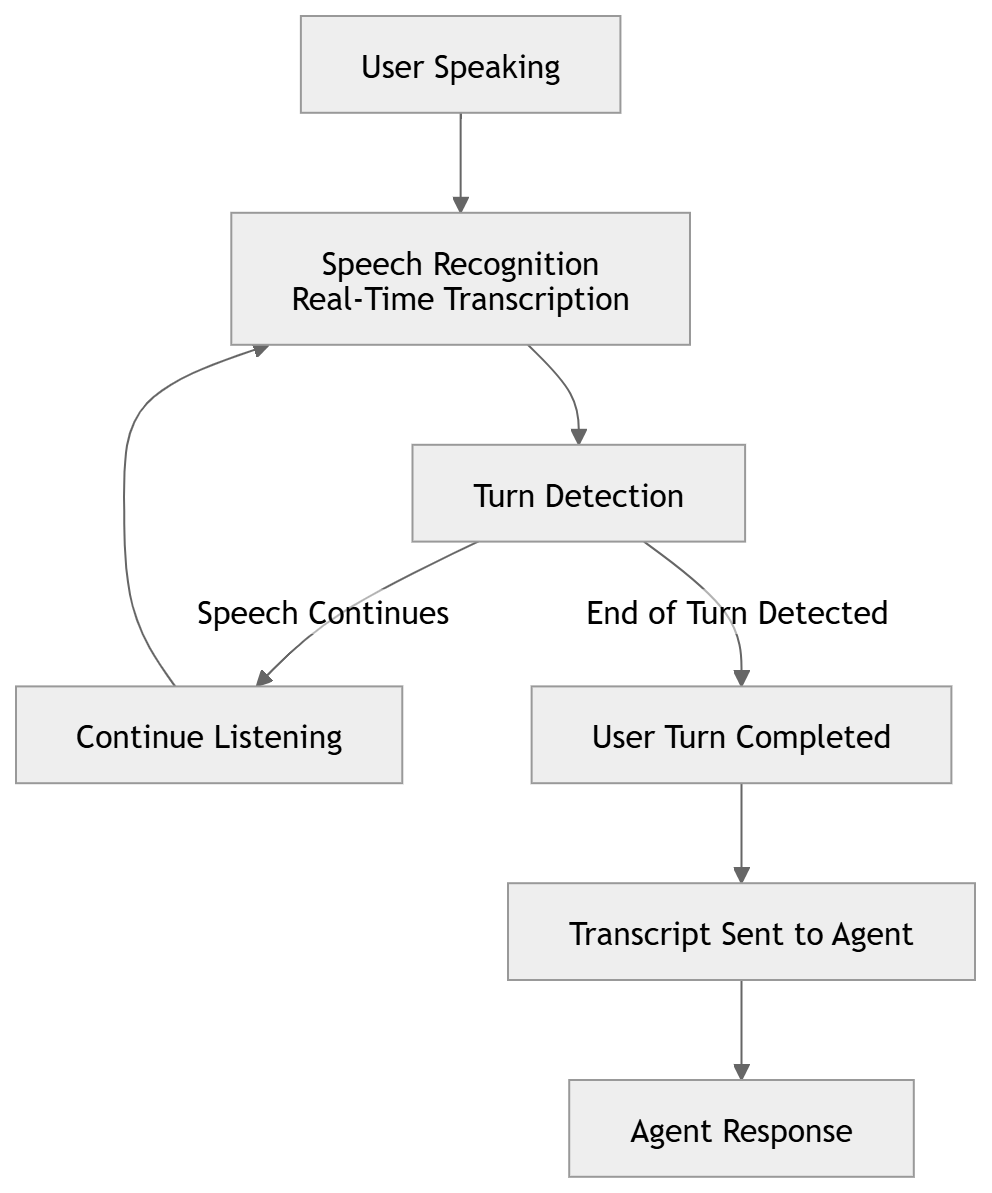
Turn Detection continuously evaluates incoming speech and determines when the user has completed their turn.
Once a turn is considered complete, the transcript is committed and sent to the Conversational Agent for processing.
User Turn Handling
These settings control how user turns are finalized before the transcript is submitted to the Conversational Agent.
| Option | Default Value | Description |
|---|---|---|
| Force End Timeout | 12 seconds | Safety timeout used to force-close the user turn if a clean stopped-speaking signal is not received. A value of 0 disables this timeout. |
| Post Turn Commit Delay | 150 ms | Additional delay after the system believes the user has stopped speaking before sending the transcript to the Conversational Agent. This allows final transcription updates and corrections to arrive before processing begins. |
Smart Turn Detection
Smart Turn Detection uses a model-based approach to determine whether the user has genuinely finished speaking.
Compared to simple silence detection, Smart Turn Detection can provide a more natural conversational experience by considering speech patterns and conversational context.
| Option | Default Value | Description |
|---|---|---|
| HTTP Service URL | Empty | Optional external HTTP endpoint used for turn detection. If not specified, the built-in server-side turn detection is used. |
| Local ONNX Model Path | Empty | Optional path to a custom ONNX model used for turn detection. If not specified, the default built-in model is used. |
| Stop Silence Duration | 0.2 seconds | Duration of silence required before Smart Turn Detection force-completes the turn when the model remains uncertain. Lower values provide faster responses, while higher values better tolerate natural thinking pauses. Values less than or equal to 0 use the system default. |
Choosing Appropriate Settings
Faster Responses
For highly interactive conversations where responsiveness is critical:
- Reduce Stop Silence Duration
- Reduce Post Turn Commit Delay
This causes the agent to respond more quickly after the user stops speaking.
Improved Accuracy
For conversations where users frequently pause while speaking:
- Increase Stop Silence Duration
- Increase Force End Timeout
This reduces the chance of the agent responding before the user has completed their thought.
Custom Detection Models
Organizations may choose to use:
- External turn detection services
- Custom ONNX models
- Specialized conversational models
Custom models can be useful when optimizing for specific languages, domains, or speaking styles.
Best Practices
- Use the default settings unless a specific tuning requirement exists.
- Test turn detection using realistic user conversations.
- Avoid excessively low silence thresholds, which may cause premature responses.
- Avoid excessively high silence thresholds, which may make the agent feel unresponsive.
- Validate behavior across different languages, accents, and speaking styles.
- Re-evaluate settings when changing speech recognition providers or models.