Voice Activity Detection Configuration
Overview
Voice Activity Detection (VAD) controls how the Voice Agent detects whether the user is speaking or silent.
In IB-X, VAD acts as a microphone gate. It determines which parts of the incoming audio stream should be treated as user speech and sent to the speech transcriber. This helps reduce background noise, avoid unnecessary transcription, and lower speech-processing cost.
Proper VAD tuning helps improve:
- Speech recognition accuracy
- Conversation responsiveness
- Noise rejection
- Transcription cost efficiency
- Natural voice interaction behavior
IB-X uses Silero VAD by default, with support for an optional custom model.
How VAD Works
A typical VAD flow follows the sequence below:
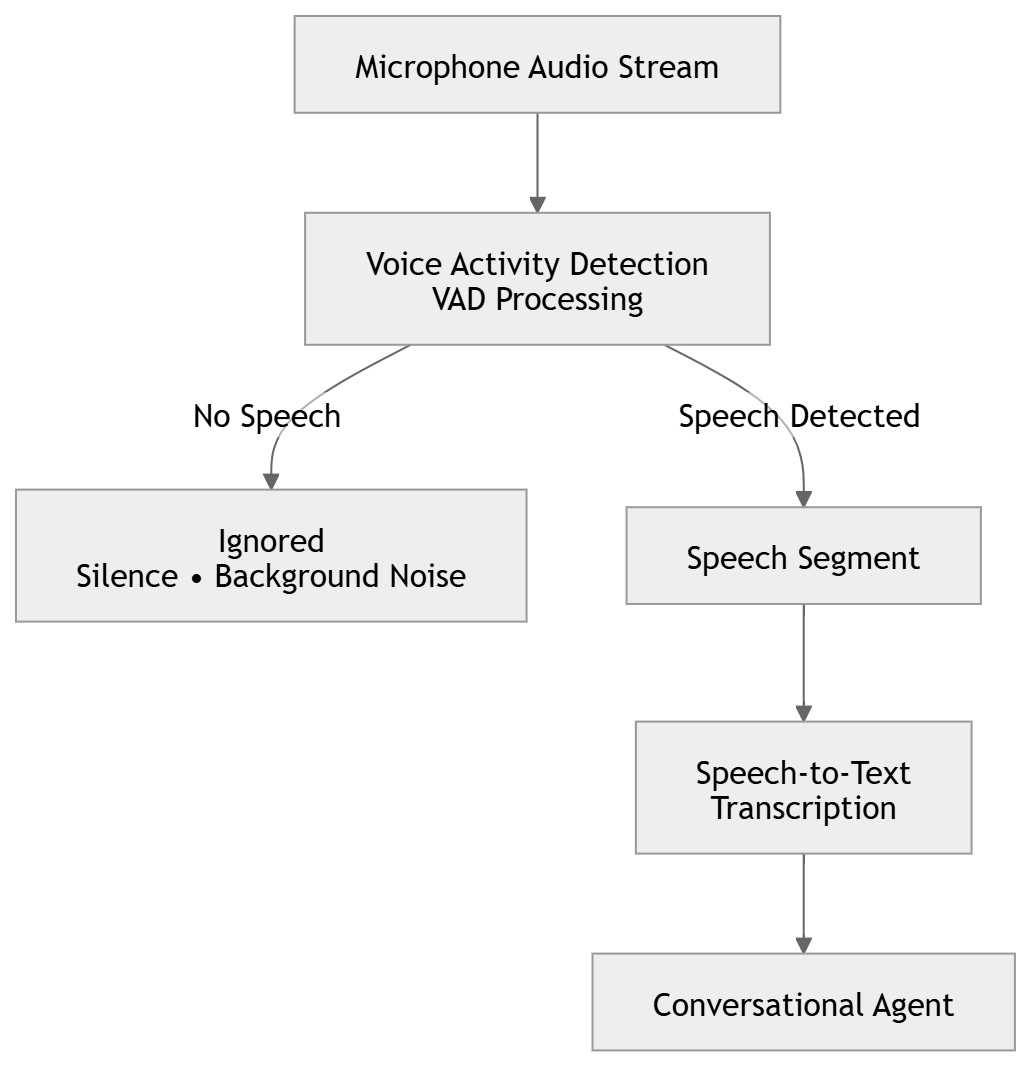
VAD continuously evaluates incoming audio and decides when speech starts, when speech continues, and when speech ends.
Only confirmed speech audio is forwarded to the transcriber.
VAD Model Configuration
These settings control the VAD model used for speech detection.
| Option | Default Value | Description |
|---|---|---|
| Model Path | Empty | Optional path to a custom VAD model file. If not specified, IB-X uses the model shipped with the product. |
Speech Detection Thresholds
These settings control how sensitive the VAD system is when detecting speech start and speech end.
| Option | Default Value | Description |
|---|---|---|
| Speech Start Threshold | 0.4 | Confidence level required to detect that the user has started speaking. The value ranges from 0 to 1. Higher values are stricter and may clip the beginning of speech. |
| Speech End Threshold | 0.18 | Confidence level used to determine that the user has stopped speaking. The value ranges from 0 to 1. Lower values keep speech active longer and help preserve soft sounds. |
Audio Preservation
These settings help prevent the beginning of user speech from being lost.
| Option | Default Value | Description |
|---|---|---|
| Pre-Roll | 500 ms | Amount of audio retained before speech is confirmed. This helps preserve the first syllable or word that may occur before VAD fully opens the speech gate. |
Speech Confirmation
These settings prevent short noises or weak audio signals from being incorrectly treated as valid speech.
| Option | Default Value | Description |
|---|---|---|
| Minimum Speech Confirmation Frames | 2 frames | Number of clear speech frames required before VAD confirms that the user has started speaking. This reduces false starts caused by background noise. |
| Pending Speech Abort Frames | 96 frames | Number of weak or unconfirmed frames allowed before VAD abandons a pending speech start. This clears false starts when speech is not confidently confirmed. |
End-of-Speech Handling
These settings control how long VAD waits before deciding that the user has stopped speaking.
| Option | Default Value | Description |
|---|---|---|
| End-of-Speech Hangover Frames | 64 frames | Number of audio frames VAD waits after speech drops before declaring speech ended. Higher values tolerate short pauses but may delay end-of-speech detection. |
Choosing Appropriate Settings
Noisy Environments
For noisy environments:
- Increase Speech Start Threshold
- Increase Minimum Speech Confirmation Frames
- Increase Pending Speech Abort Frames
This helps reduce false speech detection caused by background noise.
Soft Speakers
For users who speak softly:
- Lower Speech Start Threshold
- Lower Speech End Threshold
- Increase Pre-Roll
This helps capture softer speech and avoid clipping the beginning of words.
Faster Turn Completion
For faster response times:
- Reduce End-of-Speech Hangover Frames
- Increase Speech End Threshold carefully
This allows the system to detect speech end faster, but may cut off speech if tuned too aggressively.
Better Pause Tolerance
For users who pause while speaking:
- Increase End-of-Speech Hangover Frames
- Lower Speech End Threshold
This helps avoid ending the speech segment during natural pauses.
Best Practices
- Use the default settings unless there is a clear need to tune VAD behavior.
- Test with real microphones and realistic background noise.
- Avoid setting the speech start threshold too high, as it may clip the beginning of speech.
- Avoid setting the speech end threshold too high, as it may end speech too early.
- Use pre-roll to preserve the beginning of spoken input.
- Tune VAD together with Turn Detection and Barge-In settings.
- Validate behavior across different users, accents, speaking volumes, and environments.